TeX-related Compilation Commands for Various TeX Formats and Engines
On the 31th page of the book, Introduction to LaTeX1, Haiyang Liu provides a table to conclude TeX-related compilation commands for various TeX formats and engines:
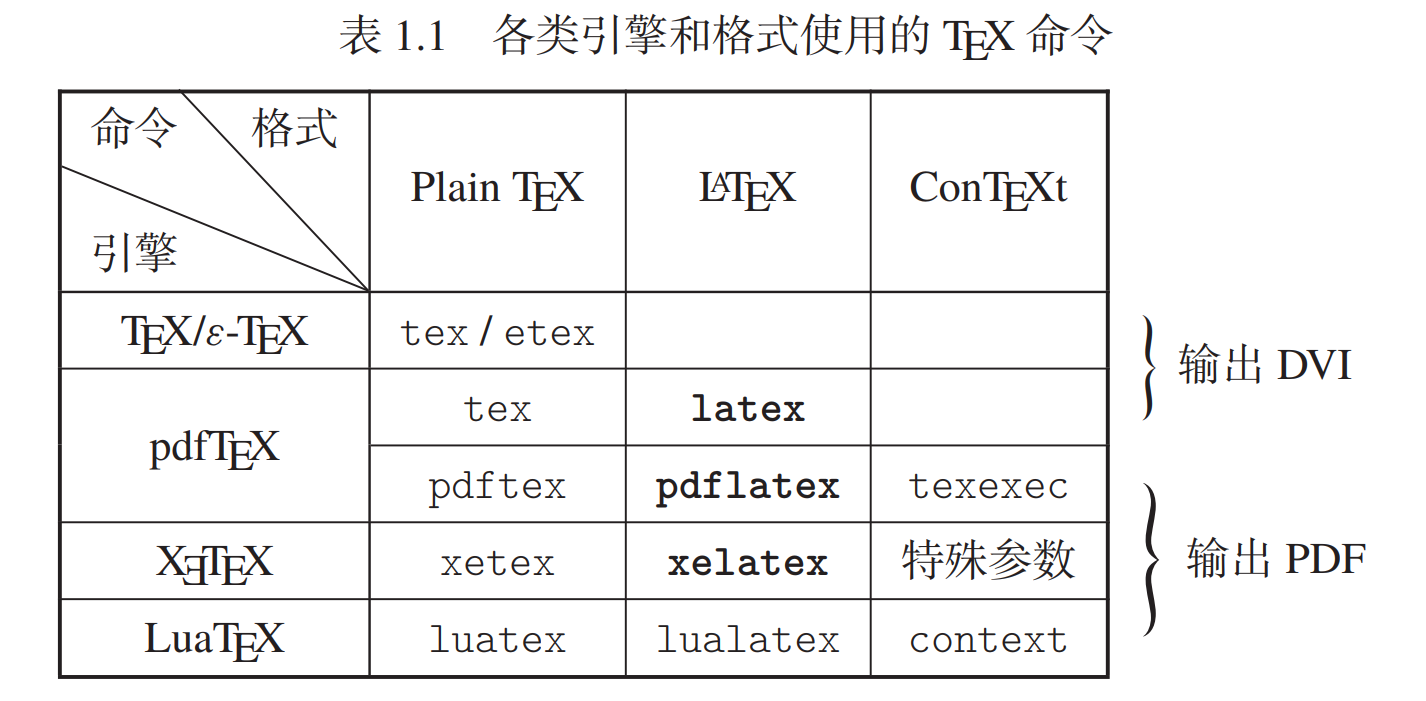
I ever mentioned this table in my blogs for several times23. So, for the convenience of my future use, I’d like to reproduce it, but in English, in this blog.
Method 1: By LaTeX TikZ
1
2
3
4
5
6
7
8
9
10
11
12
13
14
15
16
17
18
19
20
21
22
23
24
25
26
27
28
29
30
31
32
33
\documentclass{article}
\usepackage{multirow,diagbox,hologo}
\usepackage{tikz}
\usetikzlibrary{tikzmark,decorations.pathreplacing,positioning}

\newcommand{\mybox}[1]{\makebox[\widthof{(special parameters)}][c]{#1}}

\begin{document}
\begin{table}
	\renewcommand\arraystretch{2}
	\caption{Compilation commands for various \TeX\ formats and engines}
	\vspace{0.5em}
	\begin{tabular}{|c|c|c|c|}
		\hline
		\diagbox{\TeX\ engine}{Command}{\TeX\ format} & Plain \TeX & \LaTeX & \hologo{ConTeXt} \\ \hline
		\TeX/\hologo{eTeX} & \texttt{tex}/\texttt{etex} & & \mybox{}\tikzmarknode{a}{} \\ \hline
		\multirow{2}*{\hologo{pdfTeX}} & \texttt{tex} & \texttt{latex} & \mybox{}\tikzmarknode{b}{} \\ \cline{2-4}
		& \texttt{pdftex} & \texttt{pdflatex} & \mybox{\texttt{texexec}}\tikzmarknode{c}{}\\ \hline
		\hologo{XeTeX} & \texttt{xetex} & \texttt{xelatex} & \mybox{(special parameters)}\\ \hline
		\hologo{LuaTeX} & \texttt{luatex} & \texttt{lualatex} & \mybox{\texttt{context}}\tikzmarknode{d}{}\\ \hline
	\end{tabular}
\end{table}
\begin{tikzpicture}[remember picture,overlay]
	\node (aa) [above right=0.5em and 1em of a] {};
	\node (bb) [below right=0.25em and 1em of b] {};
	\node (cc) [above right=0.5em and 1em of c] {};
	\node (dd) [below right=0.25em and 1em of d] {};
	\draw[decorate,decoration={brace},semithick]
		(aa) -- node[right=3pt] {Output DVI file} (bb);
	\draw[decorate,decoration={brace},semithick]
		(cc) -- node[right=3pt] {Output PDF file} (dd);
\end{tikzpicture}
\end{document}
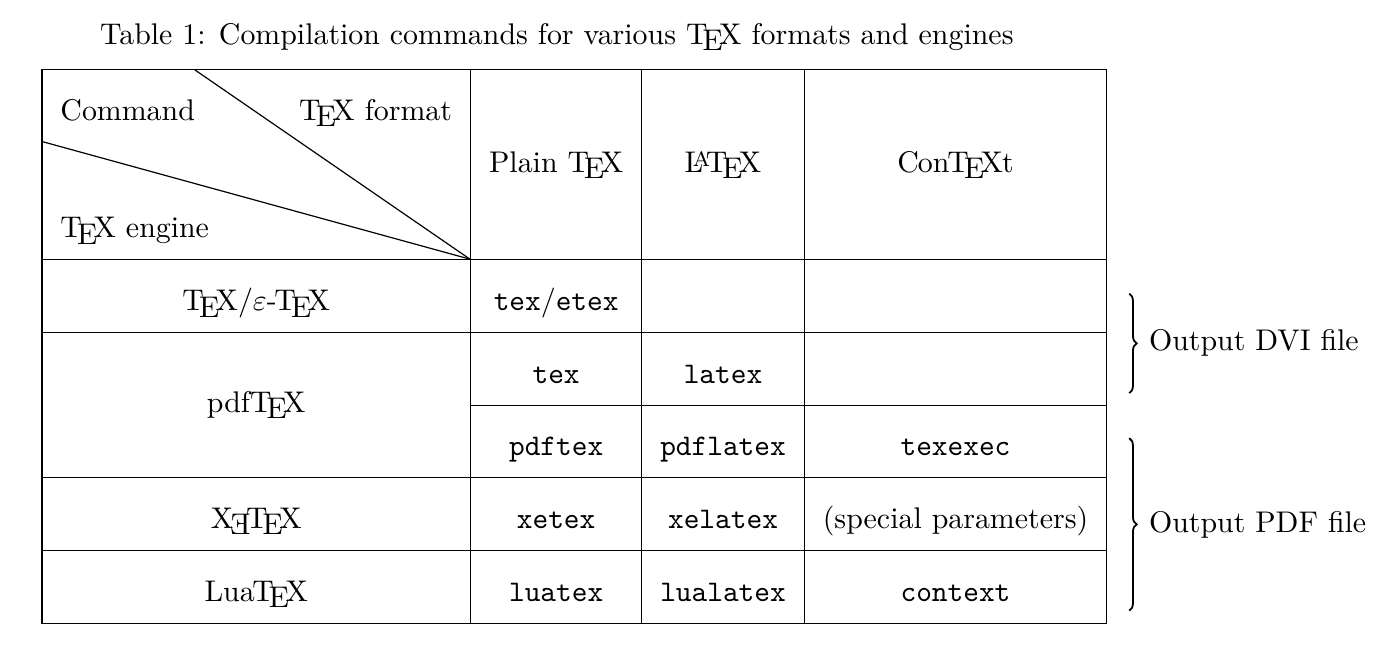
The difficulty making this table lies in how to annotate curly braces and text–“Output DVI file” and “Output PDF file”–beside the table. My solution refers to the examples4 and5 : firstly use \tikzmarknode to locate a node, and next use tikzpicture environment with options [remember picture,overlay] (both two options are necessary) to annotate. Among which, the curly braces are drawn using the \draw command with options [decorate,decoration={brace},semithick]6 (TikZ packagedecorations.pathreplacing is needed).
Another point should be noted is that, in example4, ++7 is used to position a node having a relative distance from a given node, but seemingly it doesn’t work for the “end node”, for example:
1
2
3
4
5
6
7
8
9
10
11
12
13
14
15
16
17
18
19
20
21
22
23
24
25
26
27
28
29
\documentclass{article}
\usepackage{multirow,diagbox,hologo}
\usepackage{tikz}
\usetikzlibrary{tikzmark,decorations.pathreplacing,positioning}

\newcommand{\mybox}[1]{\makebox[\widthof{(special parameters)}][c]{#1}}

\begin{document}
\begin{table}
	\renewcommand\arraystretch{2}
	\caption{Compilation commands for various \TeX\ formats and engines}
	\vspace{0.5em}
	\begin{tabular}{|c|c|c|c|}
		\hline
		\diagbox{\TeX\ engine}{Command}{\TeX\ format} & Plain \TeX & \LaTeX & \hologo{ConTeXt} \\ \hline
		\TeX/\hologo{eTeX} & \texttt{tex}/\texttt{etex} & & \mybox{}\tikzmarknode{a}{} \\ \hline
		\multirow{2}*{\hologo{pdfTeX}} & \texttt{tex} & \texttt{latex} & \mybox{}\tikzmarknode{b}{} \\ \cline{2-4}
		& \texttt{pdftex} & \texttt{pdflatex} & \mybox{\texttt{texexec}}\tikzmarknode{c}{}\\ \hline
		\hologo{XeTeX} & \texttt{xetex} & \texttt{xelatex} & \mybox{(special parameters)}\\ \hline
		\hologo{LuaTeX} & \texttt{luatex} & \texttt{lualatex} & \mybox{\texttt{context}}\tikzmarknode{d}{}\\ \hline
	\end{tabular}
\end{table}
\begin{tikzpicture}[remember picture,overlay]
	\draw[decorate,decoration={brace},semithick]
		(a)++(1em,0.5em) -- node[right=3pt] {Output DVI file} (b)++(1em,0.25em);
	\draw[decorate,decoration={brace},semithick]
		(c)++(1em,0.5em) -- node[right=3pt] {Output PDF file} (d)++(1em,0.25em);
\end{tikzpicture}
\end{document}
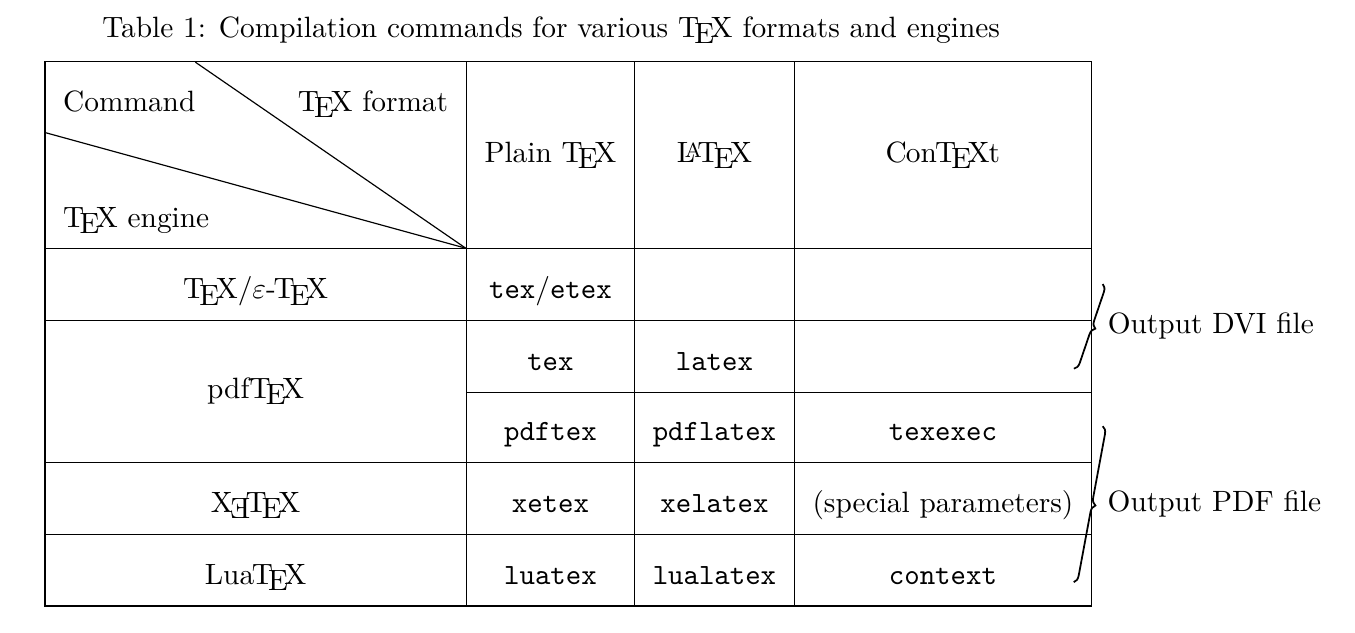
I don’t know why and don’t find an available solution, so finally I adopt the above used syntax provided by TikZ package positioning89.
Method 2: By nicematrix package
Another reproduction method is by using functions provided by nicematrix package10.
1
2
3
4
5
6
7
8
9
10
11
12
13
14
15
16
17
18
19
20
21
22
\documentclass{article}
\usepackage{nicematrix,hologo}

\begin{document}
\begin{table}
	\renewcommand\arraystretch{2}
	\caption{Compilation commands for various \TeX\ formats and engines}
	\vspace{0.5em}
	\centering
	\begin{NiceTabular}{wc{5cm}ccc}[hvlines,last-col,margin=2pt]
		\diagbox{\TeX\ engine}{Command}{\TeX\ format} & Plain \TeX & \LaTeX & \hologo{ConTeXt} & \\[2em]
		\TeX/\hologo{eTeX} & \texttt{tex}/\texttt{etex} & & & \Block{2-1}{\ Output DVI file}\\
		\Block{2-1}{\hologo{pdfTeX}} & \texttt{tex} & \texttt{latex} & & \\
		& \texttt{pdftex} & \texttt{pdflatex} & \texttt{texexec} & \Block{3-1}{\ Output PDF file}\\
		\hologo{XeTeX} & \texttt{xetex} & \texttt{xelatex} & (special parameters) & \\
		\hologo{LuaTeX} & \texttt{luatex} & \texttt{lualatex} & \texttt{context} & \\
	\CodeAfter
		\SubMatrix\}{2-5}{3-5}.[xshift=-.3em]
		\SubMatrix\}{4-5}{6-5}.[xshift=-.3em]
	\end{NiceTabular}
\end{table}
\end{document}
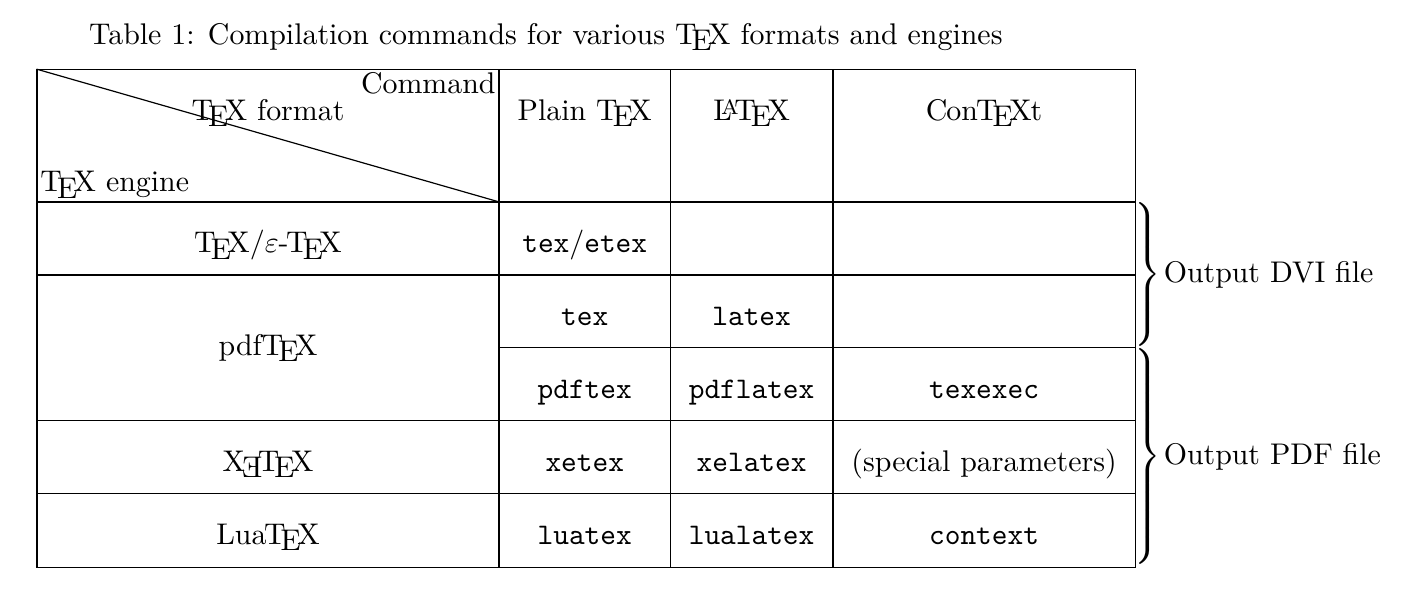
However, it can be seen that, the command \diagbox doesn’t work as expected in the NiceTabular environment of nicematrix package. As the nicematrix package documentation said11,
The command \diagbox (inspired by the package diagbox), allows, when it is used in a cell, to slash that cell diagonally downwards.
but this \diagbox command isn’t as functional as that of diagbox package like in the first reproduction.
Besides, in this method, the position of annotation content isn’t easily controlled with precision.
References
-
An XeLaTeX Compilation Error:
Undefined control sequence. \pdfglyphtounicode. ˄ -
An Example of Annotating Equation in LaTeX Using Colored Box and TikZ Package. ˄ ˄2
-
The
tikzmarkpackage, p. 10. ˄ -
Positioning groups of tikz nodes relative to their centre. ˄
-
brackets - How can I do a table with curly braces on the side?. ˄
-
The package
nicematrix, p. 14. ˄