One-Hot Encoding and Decoding in MATLAB
Introduction
MATLAB Deep Learning Toolbox provides onehotencode 1 and onehotdecode 2 functions to realize one-hot encoding and decoding. On the other hand, ind2vec 3 and vec2ind 4 functions, which are also from MATLAB Deep Learning Toolbox, can be used to realize this point in a way (as they are only available when category labels are numeric values). Some details of them will be discussed in this post.
onehotencode and onehotdecode function
Basic syntax and example “Encode and Decode Labels”
In MATLAB, users can use onehotencode function to encode category labels into one-hot vectors 1, and use onehotdecode function 2 to decode one-hot vectors into specified category labels. Their basic syntax shows as follows:
B = onehotencode(A,featureDim)encodes data labels in categorical arrayAinto a one-hot encoded arrayB. The function replaces each element ofAwith a numeric vector of length equal to the number of unique classes inAalong the dimension specified byfeatureDim. The vector contains a1in the position corresponding to the class of the label inA, and a0in every other position. Any undefined values are encoded toNaNvalues.A = onehotdecode(B,classes,featureDim)decodes each probability vector inBto the most probable class label from the labels specified byclasses.featureDimspecifies the dimension along which the probability vectors are defined. The function decodes the probability vectors into class labels by matching the position of the highest value in the vector with the class label in the corresponding position inclasses. Each probability vector inAis replaced with the value ofclassesthat corresponds to the highest value in the probability vector.
The following example 2 shows both conversion processes:
1
2
3
4
5
6
7
8
9
10
clc,clear,close all

% One-hot encoding: conversion from "category" labels to "one-hot" labels
colorsOriginal = ["red","blue","red","green","yellow","blue"];
colorsOriginal = categorical(colorsOriginal);
classes = categories(colorsOriginal);
colorsEncoded = onehotencode(colorsOriginal,1);

% One-hot decoding: conversion from "one-hot" labels to "category" labels
colorsDecoded = onehotdecode(colorsEncoded,classes,1);
where colorsOriginal is a row vector:
1
2
3
colorsOriginal =
  1×6 categorical array
     red      blue      red      green      yellow      blue
1
2
3
4
5
6
classes =
  4×1 cell array
    {'blue'  }
    {'green' }
    {'red'   }
    {'yellow'}
1
2
3
4
5
colorsEncoded =
     0     1     0     0     0     1
     0     0     0     1     0     0
     1     0     1     0     0     0
     0     0     0     0     1     0
1
2
3
colorsDecoded =
  1×6 categorical array
     red      blue      red      green      yellow      blue
The schematic showing above one-hot encoding is like:
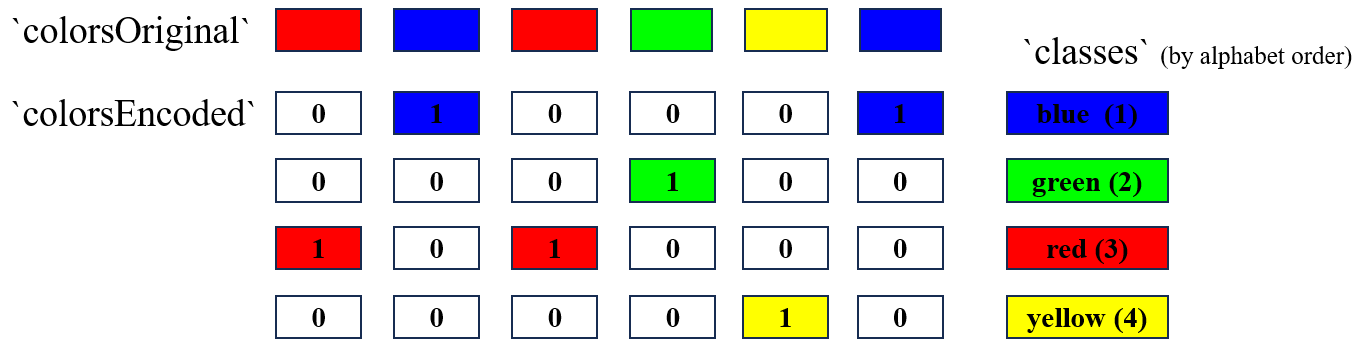
If colorsOriginal is a column vector, then the featureDim property of onehotencode function and onehotdecode function must be set to 2, so we have:
1
2
3
4
5
6
7
8
9
10
clc,clear,close all

% One-hot encoding: conversion from "category" labels to "one-hot" labels
colorsOriginal = ["red";"blue";"red";"green";"yellow";"blue"];
colorsOriginal = categorical(colorsOriginal);
classes = categories(colorsOriginal);
colorsEncoded = onehotencode(colorsOriginal,2);

% One-hot decoding: conversion from "one-hot" labels to "category" labels
colorsDecoded = onehotdecode(colorsEncoded,classes,2);
and in this case, colorsOriginal, classes, and colorsDecoded are:
1
2
3
4
5
6
7
8
colorsOriginal =
  6×1 categorical array
     red
     blue
     red
     green
     yellow
     blue
1
2
3
4
5
6
classes =
  4×1 cell array
    {'blue'  }
    {'green' }
    {'red'   }
    {'yellow'}
1
2
3
4
5
6
7
colorsEncoded =
     0     0     1     0
     1     0     0     0
     0     0     1     0
     0     1     0     0
     0     0     0     1
     1     0     0     0
1
2
3
4
5
6
7
8
colorsDecoded =
  6×1 categorical array
     red
     blue
     red
     green
     yellow
     blue
Likewise, this one-hot encoding schematic is:
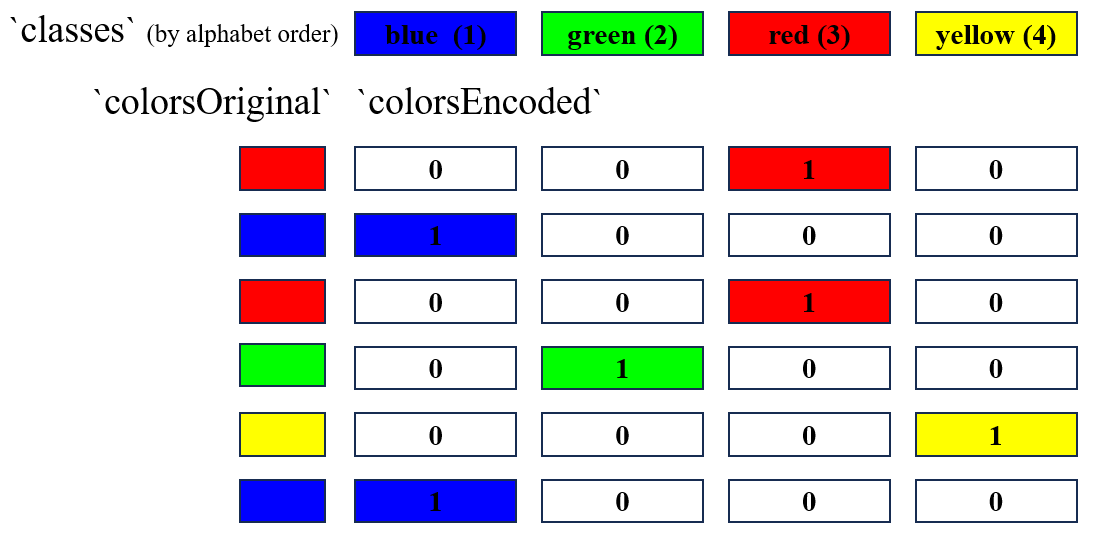
onehotencode function
Example “One-hot encode subset of classes”
onehotencode function can be used to encode labels only using a subset of the classes 1. For example, if we have six observations which are labeled as "dog", "fish", "cat", "dog", "cat", and "bird", but we just want to encode those labeled "bird", "cat", or "dog" (without "fish"), then we can realize it using the following script:
1
2
3
4
5
clc,clear,close all

observations = ["dog","fish","cat","dog","cat","bird"];
subClasses = ["bird";"cat";"dog"]; % Note the order
encodedObservations = onehotencode(observations,1,"ClassNames",subClasses);
where
1
2
3
4
encodedObservations =
     0   NaN     0     0     0     1
     0   NaN     1     0     1     0
     1   NaN     0     1     0     0
It should be noted that the element order of subClasses will influence the encoded variable encodedObservations.
As can be seen, each observation is encoded by a 3-by-1 one-hot column vector, and the observation labeled "fish" is represented by a NaN vector.
Example “One-hot encode image for semantic segmentation”
We can use onehotencode function to encode image for semantic segmentation 1. For example, the following script can convert a 15-by-15 pixel segmentation matrix of class labels into a three-dimensional one-hot encoding labels:
1
2
3
4
5
6
7
8
9
10
11
12
13
14
clc,clear,close all

% Define a simple 15-by-15 pixel segmentation matrix of class labels.
A = repmat("blue",8,15);
B = repmat("green",7,5);
C = repmat("black",7,5);
segmentation = [A;B C B];

% Convert the segmentation matrix into a categorical array.
segmentation = categorical(segmentation);

% One-hot encode the segmentation matrix into an array of type single.
% Expand the encoded labels into the third dimension.
encodedSegmentation = onehotencode(segmentation,3,"single");
1
2
3
>> size(encodedSegmentation)
ans =
    15    15     3
I haven’t dealt with image semantic segmentation tasks ever before, so I’m not sure why we need to one-hot encode labels, converting string labels to three-dimensional labels. Having said that, I believe that this conversion represent a class of similar problems, so I record it down here.
Example “One-hot encode table with several variables”
In addition, we could use for-loop to one-hot encode observations that has multi-labels 1. For example:
1
2
3
4
5
6
7
8
9
10
11
12
13
14
clc,clear,close all

% Create a table of observations of several types of categorical data.
color = categorical(["blue";"red";"blue";"green";"yellow";"red"]);
pets = categorical(["dog";"fish";"cat";"dog";"cat";"bird"]);
location = categorical(["USA";"CAN";"CAN";"USA";"AUS";"USA"]);
data = table(color,pets,location);
encData = table();

% Use a for-loop to one-hot encode each table variable
% and append it to a new table containing the encoded data.
for i=1:width(data)
    encData = [encData,onehotencode(data(:,i))]; %#ok
end
where:
1
2
3
4
5
6
7
8
9
10
11
data =
  6×3 table
    color     pets    location
    ______    ____    ________

    blue      dog       USA
    red       fish      CAN
    blue      cat       CAN
    green     dog       USA
    yellow    cat       AUS
    red       bird      USA
1
2
3
4
5
6
7
8
9
10
11
encData =
  6×11 table
    blue    green    red    yellow    bird    cat    dog    fish    AUS    CAN    USA
    ____    _____    ___    ______    ____    ___    ___    ____    ___    ___    ___

     1        0       0       0        0       0      1      0       0      0      1
     0        0       1       0        0       0      0      1       0      1      0
     1        0       0       0        0       1      0      0       0      1      0
     0        1       0       0        0       0      1      0       0      0      1
     0        0       0       1        0       1      0      0       1      0      0
     0        0       1       0        1       0      0      0       0      0      1
This kind of one-hot encoding labels can be applied in the multi-label classification tasks.
onehotdecode function
Example “Decode Probability Vectors into Most Probable Classes”
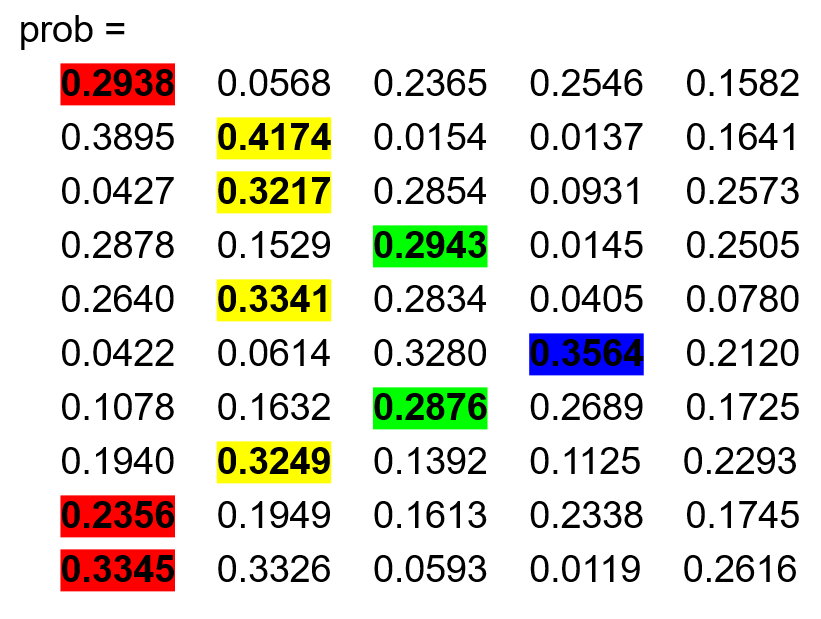
onehotdecode function can be used to decode a set of probability vectors into the most probable class for each observation 2.
Actually, one-hot vector is a kind of special probability vector, which only contains one 1 value in a position, and 0s in other positions.
1
2
3
4
5
6
7
8
9
10
11
12
clc,clear,close all

rng("default")

% Create a set of 10 random probability vectors.
% The vectors express the probability that an observation belongs to one of five classes.
classes = ["Red","Yellow","Green","Blue","Purple"];
prob = rand(10,numel(classes));
prob = prob./sum(prob,2);

% Decode the probabilities into the most probable classes.
labels = onehotdecode(prob,classes,2,"string");
The results are:
1
2
3
4
5
6
7
8
9
10
11
prob =
    0.2938    0.0568    0.2365    0.2546    0.1582
    0.3895    0.4174    0.0154    0.0137    0.1641
    0.0427    0.3217    0.2854    0.0931    0.2573
    0.2878    0.1529    0.2943    0.0145    0.2505
    0.2640    0.3341    0.2834    0.0405    0.0780
    0.0422    0.0614    0.3280    0.3564    0.2120
    0.1078    0.1632    0.2876    0.2689    0.1725
    0.1940    0.3249    0.1392    0.1125    0.2293
    0.2356    0.1949    0.1613    0.2338    0.1745
    0.3345    0.3326    0.0593    0.0119    0.2616
1
2
3
4
5
6
7
8
9
10
11
12
labels =
  10×1 string array
    "Red"
    "Yellow"
    "Yellow"
    "Green"
    "Yellow"
    "Blue"
    "Green"
    "Yellow"
    "Red"
    "Red"
ind2vec and vec2ind function
In blog “Calculate and Visualize Confusion Matrix in MATLAB: MATLAB confusionmat, confusionchart, confusion, and plotconfusion Functions” 5, it is mentioned that, in oder to use confusion and plotconfusion function, users should use ind2vec function 3 to convert “numeric data (indices)” to “one-hot vector” (Likewise, vec2ind function 4 is to convert “one-hot vector” to “indices”). The basic syntax of both functions are:
vec = ind2vec(ind)takes a row vector of indices,ind, and returns a sparse matrix of vectors,vec, containing a1in the row of the index they represent, as indicated byind;vec = ind2vec(ind,N)returns an N-by-M sparse matrix, where N can be equal to or greater than the maximum index.[ind,N] = vec2ind(vec)takes a matrix of vectors, each containing a single1and returns the indices of the ones,ind, and the number of rows invec,N.
For example:
1
2
3
4
5
6
7
8
9
10
clc,clear,close all

% Convert the indices to one-hot vector.
% 3 observations and 4 classes
ind = [3,1,2];
n = 4;
vecConverted = full(ind2vec(ind,n));

% Convert one-hot matrix to indices.
[indConverted,n] = vec2ind(vecConverted);
where:
1
2
3
4
5
vecConverted =
     0     1     0
     0     0     1
     1     0     0
     0     0     0
1
2
indConverted =
     3     1     2
As can be seen, ind2vec and vec2ind functions also can realize the conversion between category labels and one-hot labels. However, they are just suitable for the case that category labels are numeric data, rather than strings. Therefore, compared with ind2vec and vec2ind, onehotencode and onehotdecode are more functional and flexible. For example, we could reproduce script using onehotencode and onehotdecode:
1
2
3
4
5
6
7
8
9
clc,clear,close all

% Convert the indices to one-hot vector.
% 3 observations and 4 classes
ind = [3,1,2];
vecConverted = onehotencode(ind,1,"ClassNames",1:4);

% Convert one-hot matrix to indices.
[indConverted,n] = vec2ind(vecConverted);
The results are the same as above ones:
1
2
3
4
5
vecConverted =
     0     1     0
     0     0     1
     1     0     0
     0     0     0
1
2
indConverted =
     3     1     2
References